
Finish What You Start
Stop starting, start finishing.
A small board for your tasks: what’s waiting to start, what you’re doing now, and what’s done. It rests on one idea: keep only a few things in progress, and finish one before you start the next.
- YOU PLAN
- As you go
- THE LIMIT
- 3 in progress
- CORE MOVE
- Finish one, then start one
The idea
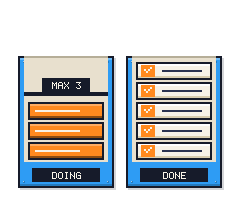
Put your tasks on a small board so you can see them all: what’s waiting to start, what you’re doing, and what’s done. Then cap what you’re doing at three.
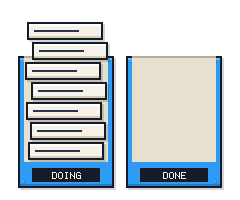
The limit is what makes it work. Each open task pulls at your attention, so ten half-started things feel heavier than ten finished ones. A cap of three means the only way to take on something new is to finish, or to park what’s stuck.
How it works
Tasks move left to right across a small board, one finish at a time.
01ANYTIME
Add to the backlog
Everything you haven’t started, in the order it came in.
02WHEN THERE’S ROOM
Pull into Doing
Keep it to three. A new task only comes in when there’s a free spot.
03WHEN IT’S STUCK
Park it in Waiting
Work stuck on someone else. It doesn’t count against your three.
04AS YOU GO
Finish to Done
Done stays where you can see it. Each finish frees a spot.
PULL THE NEXT ONE
Then back to step 01.
Any time: when a waiting task unblocks, it goes back into Doing. Changed your mind about one? Send it back to the backlog. Once a week: chase what’s in Waiting, then look back at Done.
Signs it’s working
- After a week, Doing holds three or fewer most of the time.
- Blocked tasks sit in Waiting, not in Doing.
- Done fills up every week, not just with one or two items.
- After a month, you rarely start something and leave it for days.
Common pitfalls
Starting a fourth (and fifth) task
Treat a fourth task as a signal. Finish one first, or move the stuck one to Waiting.
Parking everything in Waiting
Waiting is for tasks stuck on someone else, not for tasks you’d rather avoid.
Tasks too big to finish
“Redo the website” never gets done. Split it, and start the first piece.
Skipping the weekly look
Waiting quietly fills up. Clear it once a week.
Where it comes from
Finish What You Start is based on Personal Kanban. Here’s the original, what we changed to make it simpler, and how to make it yours.
1 · THE ORIGINAL
Personal Kanban shrinks the kanban boards used by factories and software teams down to one person. Jim Benson and Tonianne DeMaria Barry set it out in their book Personal Kanban. It has two rules: make your work visible, and limit your work in progress.
2 · OUR VERSION
The original asks you to design your own board and pick your own limit. We set it up for you: four columns (Backlog, Doing, Waiting, Done) and a limit of three, so there’s nothing to design before you start.
3 · YOUR VERSION
To Do Machine starts every system with the fewest rules that still work. That’s on purpose: it’s quicker to learn, and using it shows you what you actually need. Try it as is for a couple of weeks, then change what doesn’t fit.
For example: Three feels tight? Try four, and check Waiting every day.
GET THIS SYSTEM
To Do Machine can customize this system for you
To Do Machine has this system built-in, ready for you to customize to work exactly how your brain works.