
Plan Your Day
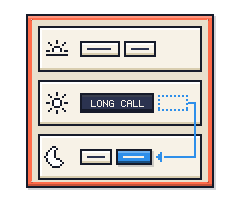
Stop planning your day by the hour. Three slots is enough.
Each of today’s tasks gets a part of the day: morning, afternoon or evening. It rests on one idea: deciding roughly when you’ll do something makes it far more likely you’ll do it.
- YOU PLAN
- Night before or morning
- THE LIMIT
- Three parts of the day
- CORE MOVE
- Give each task a slot
The idea
Give each of today’s tasks a part of the day: morning, afternoon or evening. No clock times.
Deciding roughly when makes it far more likely you’ll start. It takes seconds, and it turns “sometime today” into “this afternoon”. When the day shifts, you move a task one part later instead of replanning.
How it works
Place each task in a part of the day, then work the part you’re in.
01NIGHT OR MORNING
Collect the day’s tasks
What’s due, what’s left from yesterday, what you want to get to.
02SECONDS PER TASK
Give each a part of the day
Morning, afternoon or evening. No clock times.
03DURING THE DAY
Work the part you’re in
Ignore the rest of the day until you get there.
04WHEN PLANS CHANGE
Push it forward
A task that didn’t happen moves one part later, not into guilt. Leftovers come back tomorrow.
SORT AGAIN TOMORROW
Then back to step 01.
No day yet? Those tasks wait on a separate later list until you give them one. Scroll it once a week and delete what no longer matters.
Signs it’s working
- After a week, placing your day takes a minute or two.
- Few tasks get pushed more than once a day.
- After a month, a task rarely comes back more than twice, and the later list fits on one screen.
Common pitfalls
Putting everything in the morning
Plan what fits. Move the rest to later parts before the day starts, not after it falls apart.
The same task bouncing every day
If it has come back three times, make it smaller, give it a real date, or delete it.
Skipping the sort
An unplaced day is just a list again. Do it at the same time every day.
A later list that becomes a junk drawer
Review it weekly and give each task a day, or let it go.
Where it comes from
Plan Your Day is based on time blocking. Here’s the original, what we changed to make it simpler, and how to make it yours.
1 · THE ORIGINAL
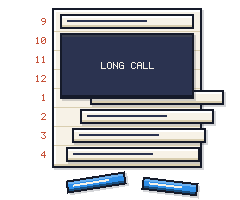
Time blocking means giving your tasks a place on the clock instead of keeping them in one long list. The usual version plans every hour of the day. That’s precise, but brittle: one long call and the plan breaks.
2 · OUR VERSION
We kept the useful part, a place in the day for every task, and dropped the brittle part. You pick morning, afternoon or evening instead of an hour, so the plan bends when the day does.
3 · YOUR VERSION
To Do Machine starts every system with the fewest rules that still work. That’s on purpose: it’s quicker to learn, and using it shows you what you actually need. Try it as is for a couple of weeks, then change what doesn’t fit.
For example: Afternoons too long to plan as one? Split them in two.
GET THIS SYSTEM
To Do Machine can customize this system for you
To Do Machine has this system built-in, ready for you to customize to work exactly how your brain works.