Capture Everything
Inbox zero isn’t just for email.
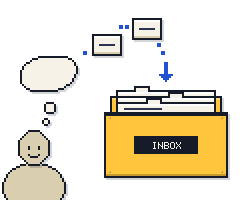
Every task gets out of your head and into one inbox, then you decide once what each one is. It rests on one idea: your mind is for having ideas, not holding them.
- YOU PLAN
- Daily sort, weekly review
- THE LIMIT
- One decision per task
- CORE MOVE
- Capture, then decide once
The idea
Write down everything that has your attention, in one inbox. Then decide once what each item is: what’s the next action? If it takes under two minutes, do it now.
It works because unfinished things nag. Every “open loop” you carry in your head pulls at your attention. A task you’ve written down, with a clear next step, lets your mind let go. You stop re-deciding the same things all day.

How it works
Capture all day. Empty the inbox once a day. Review once a week.
01AS IT COMES UP
Capture
Anything that has your attention goes into one inbox. Don’t sort it yet.
02ONCE A DAY
Clarify
Empty the inbox. Is there something to do? Under two minutes? Do it now.
03SAME SITTING
Organize
Everything else goes in one place: next actions, dated tasks, waiting on, someday.
04BETWEEN THINGS
Engage
Work from next actions and today’s dated tasks, not from the inbox.
KEEP CAPTURING
Then back to step 01.
Once a week: look over what’s coming up, check each project has a next action, chase what you’re waiting on, and move any someday idea that’s ready now.
Signs it’s working
- After a week, the inbox reaches zero at least once a day.
- Your next actions are things you could start right now, not vague goals.
- You stop texting yourself reminders or using sticky notes.
- After a month, you do the weekly review most weeks, and your someday list shrinks as well as grows.
Common pitfalls
Working out of the inbox
The inbox is for deciding, not doing. Sort it, then work from your next actions.
Big, vague next actions
“Plan the move” isn’t an action. Write down the first step, like “call two movers”.
Skipping the weekly review
Without it, the system goes stale and you stop trusting it. Book it like a meeting.
Scheduling things with no real day
Give a task a date only if it truly belongs to that day. Everything else is a next action.
Where it comes from
Capture Everything is based on Getting Things Done. Here’s the original, what we changed to make it simpler, and how to make it yours.
1 · THE ORIGINAL
David Allen set out the method in Getting Things Done (2001, revised 2015). You write down everything that has your attention, then ask of each item: what’s the next action? Allen calls the things you haven’t dealt with “open loops”.
2 · OUR VERSION
Full GTD adds contexts, a tickler file and six “horizons of focus”. We kept the five steps (capture, clarify, organize, engage, review) and one inbox. That’s enough to get everything out of your head.
3 · YOUR VERSION
To Do Machine starts every system with the fewest rules that still work. That’s on purpose: it’s quicker to learn, and using it shows you what you actually need. Try it as is for a couple of weeks, then change what doesn’t fit.
For example: Daily inbox sweep too much? Try every other day. Add contexts later if you miss them.
GET THIS SYSTEM
To Do Machine can customize this system for you
To Do Machine has this system built-in, ready for you to customize to work exactly how your brain works.